


A warehouse shipment in Business Central lets you bundle outbound items into a single document, regardless of which source document the items come from. You can combine sales orders and purchase return orders in the same warehouse shipment because the warehouse treats them all as outbound items.
You can pull source documents into a warehouse shipment in two ways. Use the import function to manually select documents from the open source document list. Or use the “Use Filters to Get Source Documents” function to filter which document types to include automatically.
From the warehouse employee’s point of view, the source document type does not matter. Whether the items come from a sales order or a purchase return order, they are handled together in one warehouse shipment.
What a warehouse shipment is
A warehouse shipment is a document for bundling together outbound items, meaning the items you are going to ship. It works independently of the source type the items come from. That means you can group items from different document types into one shipment and handle them as a single unit on the warehouse floor.
Importing source documents directly
When you create a new warehouse shipment, you can import your source documents directly into it. Opening the open source document list shows you everything that is ready to ship. In a typical scenario this includes both purchase return orders and several sales orders.
You select whatever you want to import from the list and press OK. The lines from both the purchase return order and the sales order are then imported into the same warehouse shipment. From a warehouse perspective these are all outbound items, so it makes sense to keep them in one shipment.
Using filters to get source documents
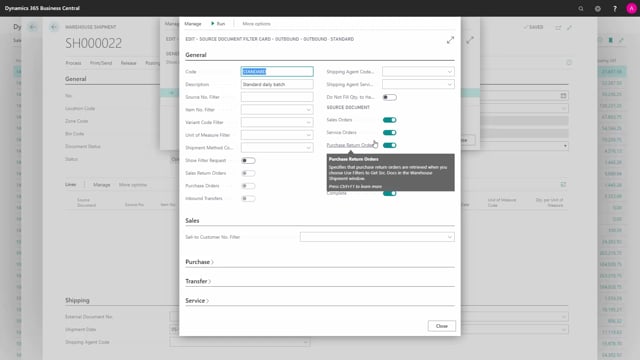
The other option is the “Use Filters to Get Source Documents” function. This works in a similar way, but it gives you more control through filters. When you modify your filters, you can change which documents to include in the shipment.
For example, you can choose to include purchase return order documents along with other document types. When you run the function, all matching documents are pulled into the warehouse shipment. If you deselect some of them in the filter setup, those documents do not come into the shipment.
Why the source document type does not matter
To the warehouse employee, it makes no difference whether an item comes from a sales order or a purchase return order. They are all outbound items that need to leave the warehouse. That is why you can keep them together as one warehouse shipment and still handle the picking and shipping process the same way.
Q&A
What is a warehouse shipment in Business Central?
A warehouse shipment is a document that bundles together outbound items, meaning the items you are going to ship. It works independently of the source document type, so you can group items from different sources into one shipment.
Can I combine sales orders and purchase return orders in the same warehouse shipment?
Yes. From a warehouse perspective both are outbound items, so you can import lines from both a sales order and a purchase return order into a single warehouse shipment.
How do I add source documents to a warehouse shipment?
You have two options. You can import source documents directly by selecting them from the open source document list and pressing OK. Or you can use the “Use Filters to Get Source Documents” function to filter which document types to include.
How do I control which documents are included when using filters?
When you modify your filters, you can change which documents to include. If you deselect certain documents in the filter setup, they will not be pulled into the warehouse shipment when you run the function.