
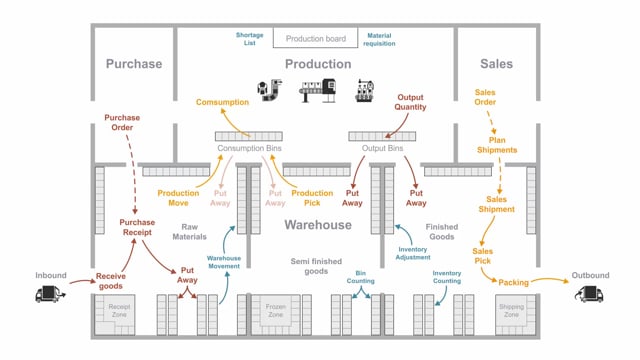


In Business Central, “inventory” and “warehouse” describe two different levels of stock handling. Inventory is the basic functionality where you receive and ship goods directly on sales orders, purchase orders, production, and assembly orders, and where transactions are recorded as item ledger entries. Warehouse is the more advanced functionality that adds bin-level handling, creates separate warehouse entries, and lets you track which items are placed in which bins and in which quantities.
Choose basic inventory when you do not have a large warehouse with bins. Choose warehouse functionality when you need to manage items per bin, which typically also involves scanners to register every movement of goods from one location to another.
What inventory means in Business Central
The inventory term refers to the basic functionality in Business Central. This is where you create sales orders or purchase orders and receive or ship goods directly on those documents. It also covers consuming and outputting items in production, handling assembly orders, and doing inventory counting.
All of this is reflected at the item ledger entry level. If you don’t have a big warehouse with bins and a range of warehouse documents, basic inventory is what you’ll be working with. These are the standard processes that the basic inventory functionality supports.
What warehouse means in Business Central
The warehouse term refers to the activities that take place inside the warehouse itself. It creates warehouse entries, which are a detailed ledger of all the transactions in the warehouse. These entries refer to the bins where you want to place your items.
With warehouse functionality, you can determine which items are placed in which bins and in which quantities. That level of detail is the key difference from basic inventory.
The main difference between inventory and warehouse
The core distinction comes down to bin handling. With basic inventory, you cannot handle items per bin. With warehouse functionality, you can track items at the bin level, including quantities per bin.
The warehouse setup normally also requires scanners or similar functionality. You use these to walk around the warehouse and register every time you move something from one place to another.
Q&A
What is the difference between inventory and warehouse in Business Central?
Inventory is the basic functionality for receiving and shipping goods directly on sales orders, purchase orders, production, and assembly orders, recorded as item ledger entries. Warehouse adds bin-level handling, creates separate warehouse entries, and lets you track which items sit in which bins and in which quantities.
When should you use basic inventory instead of warehouse functionality?
Use basic inventory when you don’t have a large warehouse with bins. It covers the standard processes of receiving, shipping, production consumption and output, assembly orders, and inventory counting.
Can you handle items per bin with basic inventory?
No. Basic inventory cannot handle items per bin. You need the warehouse functionality to determine which items are placed in which bins and in which quantities.
Does warehouse functionality require scanners?
Warehouse functionality normally requires scanners or similar tools so you can move around the warehouse and register every time you move goods from one location to another.